
If your public library offers Hoopla Digital services, and 1,200 of them in the US and Canada do so far, you’ve got access to a metric tonne of digital streaming.
My local library doesn’t participate (though several other counties in Maryland do, including Frederick County, Howard, Prince George’s, Prince William, and Charles County, along with much of eastern Maryland ). But my former local library in New Jersey does – and I’m sad I didn’t realize until now how useful this service is. I would have explored it much earlier.
NB: I was offered a trial membership so I could evaluate the service. I’m not being compensated for this review. The Press membership I was given so I could explore the site and the app offers a higher borrow limit than some library patrons may have.
Short review: if you have access, and you enjoy a lot of audiobooks, comics, or books from presses like Riptide or Dreamspinner, I think you’ll really like it.
Alas, the fastest way to find out if your library offers access is to either look for mention of Hoopla on your local library website, or search “[your local library] + Hoopla” to see if anything appears in the results.
Or, you can try to sign up for Hoopla, and it’ll ask you to choose a library once you’ve created an account username and password.
But I did find a map online with a list of participating libraries on the right side – though I can’t verify its accuracy.
So, now that you’ve maybe figured out if you have access, why should you want it? Hoopla offers digital access to television shows, movies, music, ebooks, comics, and audiobooks. The service is free for library patrons. Libraries pay a fee for each item borrowed, so often the total number of items per patron varies, and can be anywhere from 3 to 10 items borrowed per patron per month, depending on the library’s terms.
There’s a Hoopla app for Android and iOS devices, so you can stream shows, read ebooks, listen to audiobooks – basically all the things we like to do in the comfiest location – through your library at no additional cost to you. You can also use the app to connect to a Chromecast and view borrowed visual materials on your very nice television set.
There’s a pretty good romance catalog, too – but the list of publishing providers doesn’t include some of the more obvious names, like, you know, PenguinRandomHouse or Macmillan. I think those looking for ebooks from major authors in romance will be a little bummed out by the lack of options.
But for those who enjoy m/m romance from Dreamspinner or Riptide, dive in and save your dollars – their catalogs should keep you happy for awhile. And since I’ve heard from so many of you how expensive the books are, Hoopla may save your reading budget by a lot. There are also ample lists from publishers like Sourcebooks (including one of mine) but inside those catalogs, you can’t isolate by genre.
Finding specific ebooks by genre may prove a little frustrating. There are ample tags, and I can isolate the publisher once I pull up a book from that press, but I can’t search by publishing house. I wasn’t able to narrow my searches to “lesbian romance,” for example. There’s “lesbian” and a category for “romance-lgbt” but not one that isolates lesbian romance titles. And the “multicultural-interracial romance” tag has a total of 41 titles.
Audiobook folks, if you’ve been burning through your Audible credits too fast, Hoopla might be your new best friend. For example, “Jaci Burton” in the search yields a number of her audiobooks, but no ebooks.
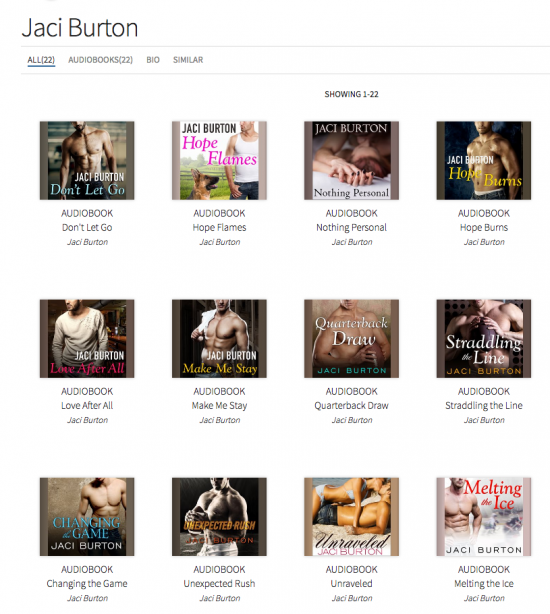
I did a few searches for major names, and often came up with nothing – Nora Roberts, for example, only lists the Love Between the Covers documentary, and no books, audio or otherwise. Sherry Thomas – audiobooks only, and just seven of them. Tessa Dare – same thing. There were zero results for Victoria Dahl, and only some titles for Theresa Romain. Christina Lauren: audio only. So, like I said, if you’re an audiobook fan, this is a great match for you if your library provides access.
In music, I found the Hamilton cast recording, and if you want to take a deep dive into Madonna’s catalog, there’s a lot to keep you busy. Newer albums from Sting and Lady Gaga were included, too – there’s a lot of material under “popular music.”
The digital comics selection included the comics I currently subscribe to – the Archie reboot and the Josie & the Pussycats reboot. The Lumberjanes are in the catalog, too, along with Monstress, Volumes 1-6. And, hold on to your hats, six volumes of Saga, too. The account I have currently gives me a week with each comic I borrow, and it’ll return automatically.
Reading comics on my phone wasn’t the most comfortable. Whereas Comixology’s app has the option to use “Guided View,” which offers a sequential closeup on each panel, box, piece of dialogue, or focal point of the page (making it easier for folks like me with heinous eyesight to read them on a smaller screen), the Hoopa app for comics shows the full page, and you have to zoom in.
For example, here’s a page from Sabrina, the 2016 reboot.
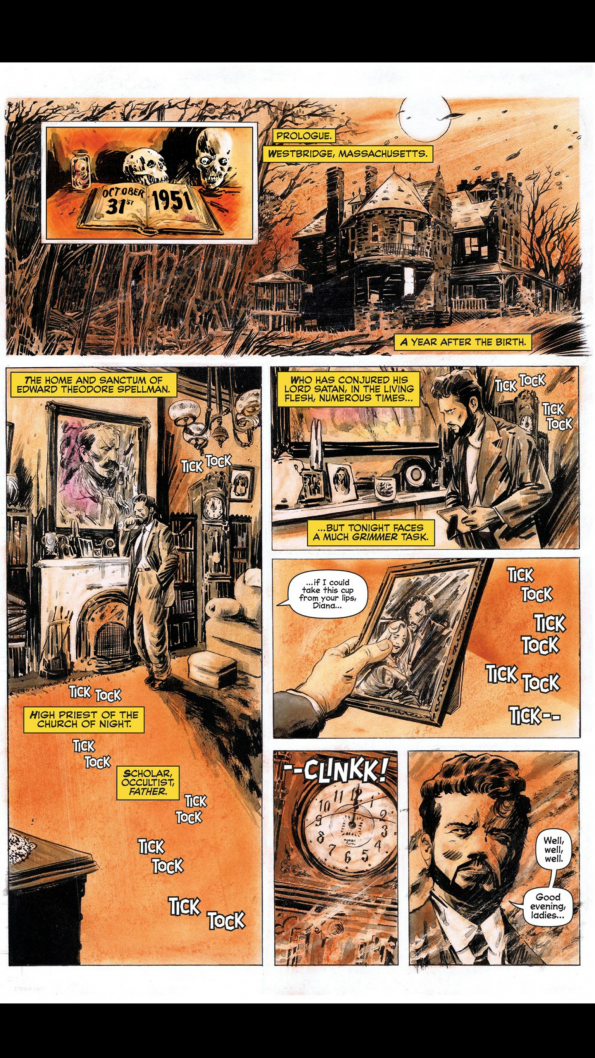
On a browser, piece of cake to read. On my phone, it was difficult.
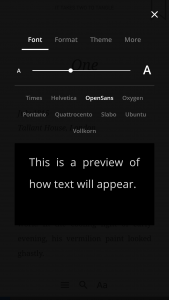 Reading ebooks, however, was much more comfortable and offered a lot of options to customize the reader experience.
The Hoopla reader offers nine different fonts, a wide variety of text sizes, plus formatting options that allow you to customize the margins and spacing, and themes that allow you to choose from five background and text color combinations.
For those who use screen readers, I don’t have a way of testing whether Hoopla is compatible – if you know, please feel free to comment or email me!
In movies, the borrowing terms for me were 72 hours, which is similar to the digital rental from our cable provider. And while there weren’t brand new movies, there are a number of documentaries I have on my list of films I want to see, like Sriracha and Somm. Love Between the Covers is in the catalog, too. There are some French language movies, Chinese cinema, Spanish, and a few in Hindi as well.
Of note: in the settings, you can set the searching and browsing to “Only show kid-appropriate content in your browse and search results,” so if you put Hoopla on a young person’s device, you can limit their access accordingly.
Just wanted to mention that if you double tap when reading comics in Hoopla it actually does let you go cell by cell, exactly like Comixology.
I use Overdrive and love it for audiobooks and downloaded Hoopla but the NY Public library isn’t listed. I also have a Northern California library card but that doesn’t work either – can you not use Hoopla without a corresponding library? How unfortunate. How could the NY Public library not be on the list?
Thanks!