
 It’s sharing time!
Over the past few years, we’ve shared different versions of this reading tracking spreadsheet and each year it’s been improved by one of you!
And I’ve received so many email messages and requests for more options from readers who absolutely adore it.
Seeing my reading totals grow slowly this year has been both frustrating and edifying: I knew I was having trouble reading, but I could also spot the slowdown early enough to check in with my brain and ask what was going on. And about midway through 2023, my format changed to nearly all audiobooks. Yay audiobooks!
The great thing about this spreadsheet is that it’s so very easy to customize – especially now. You can modify or add columns of data and track the things that are important to you. I’ve made additions to track where I found the book (e.g. Library, NetGalley, Amazon, Kobo, Hoopla, etc).
Most Important!
First, and most important, THANK YOU ANDREA. The original spreadsheet was created and shared by Andrea in the comments of podcast Episode 275 about Reading Habits – back in 2017! Woo, it’s been a minute or six. Thank you so, so very much, Andrea. We wish you the most excellent of reading for the rest of your waking life.
And second, THANK YOU ESTELLE AND MAX! The spreadsheet is SUPREMELY easy to customize thanks to Estelle and Max’s alterations, and I cannot tell you how much I love it.
Thank you to Elizabeth, Janet, and many others who have commented about their own improvements and suggestions, some of which I’ve incorporated to improve this one.
Want to get started and not read any more about tracking your reading? I get it – here, you can go directly to the spreadsheet download link.
And! New this year: I have a new and super powered version of this spreadsheet modified and shared by Elizabeth, and you can jump right to that part here.
If you’re curious about why and how we track our reading using this shared spreadsheet, read on!
Tracking your reading?
Doesn’t that mean you’re entering a lot of books?
Oh, yes. Yes, it does. And that means delicious, nutritious data!!
Present and Future Sarah do not ever remember what Past Sarah did, so Past Sarah tries to help out by leaving us notes. And since I receive a lot of books well in advance of publication date, or after a long library hold, leaving myself a record helps me manage my reading.
Combining my Reading Planning sheet and Andrea’s original Reading Tracking sheet into one spreadsheet with three tabs consolidated my reading info into one location. You don’t have to use the To Be Read tab if you don’t want to, but in case it would be useful, it’s available.
If you struggle to remember to update the sheet, may I suggest a weekly reminder? Back in 2019 (remember then?) I set reading goals for myself and I set a weekly reminder on my ToDo-ist to log my reading every Friday so I don’t miss anything. (NB: affiliate link if you want to try ToDo-ist out – I use it to run most of my daily life, alongside Google Calendar.)
Because I’ve been tracking my reading list and my reading habits for so long, I have insights into my reading tastes, what books I sped through quickly, which ones I savored, and which genres are showing up in greater numbers in my history. Each year I make a few changes based on those insights to capture new things I want to track.
You do not, of course, have to use the columns in the sheet as given. You can track whatever you want, and change them to account for aspects of your reading that are important to you. This is why the spreadsheet is so nifty, and why I really enjoy using it.
Here’s a link to a copy of the 2024 Reading Tracking Spreadsheet:
https://docs.google.com/spreadsheets/d/17bDO0DQXt-fNzQmCAI9WHn0layfTSKJUJ7hdcge_tJI/edit?usp=sharing
This link is view-only.
Ahem.
This Link is View-Only.
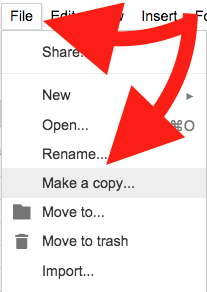
All you need to do is click File, then Make a Copy to save your own version to your Google Drive.
Let’s take a tour, shall we?
Starting with the Books Read 2024 tab: this is where you enter the data on the books you’ve read.

Title, Author, Series, Pub Date, Pages, Format, and the date started, ended, and days read fields are all pretty self explanatory.
The genre fields, and the fields about diverse characters and marginalized writers require a few notes.
First, be consistent about what terms you use. Currently, the genres listed are as follows:
- DNF
- Category Romance
- Contemporary Romance
- Erotic Romance
- Romantic Suspense
- Women’s Fiction
- Historical Romance
- Paranormal Romance
- Fantasy Romance
- Sci-Fi Romance
- Graphic Novel
- Fantasy
- Urban Fantasy
- Steampunk
- Sci-Fi
- Historical Fiction
- Mystery
- Thriller
- Nonfiction
- Teen/YA
- Other/TK
- Other/TK
- Other/TK
- Other/TK
You can use different terms or fill in new ones instead of “Other/TK.” You can also use more than one term to describe a book.
Under columns such as Diverse Characters and Marginalized Writers, you also need to be consistent in what you enter in those fields. You can use “Yes” and “No” as the answers, as I have in the sample data, or you can be more specific, as the chart on the next tab will support multiple terms. Just be consistent. You can’t mix up “Yes” and “yes” or your data will be a bit wonky.
In Book Source, I am tracking where my books come from: the library? Amazon KU? Kobo? Hoopla? NetGalley? As with the other columns, you have to be consistent (e.g. “NetGalley” and “Netgalley” will produce separate results in the charts on the next tab) but you can enter as many sources as you use to find your books: Scribd, AO3, FanFiction.net, Tumblr, Libby, Little Free Library, Stole It From My Mom, etc. The possibilities are endless.
You don’t have to use any of these columns if you don’t want to, of course. You can make up your own things to track. Just make sure to use consistent terms for that data so the Statistics render correctly.
Statistics
Now let’s look at the Statistics page because this is where the magic happens.
Andrea, as the original creator of all this spreadsheet magic, deserves all the praise and applause, as do Estelle and Max for upgrading the genre list to make it even easier to edit!

I love this gif and I love the cream gown on the woman who stands up first. Anyway.
On the second tab, the data you entered from the first tab is turned into graphs, statistics, and charts that allow you to see the results of your reading.
Pivot Tables, Oh Yeah.
The spreadsheet as I’ve shared it has some sample data that you can delete, obviously. That data is only provided to give you a preview of the statistics that are being tracked.
For example:
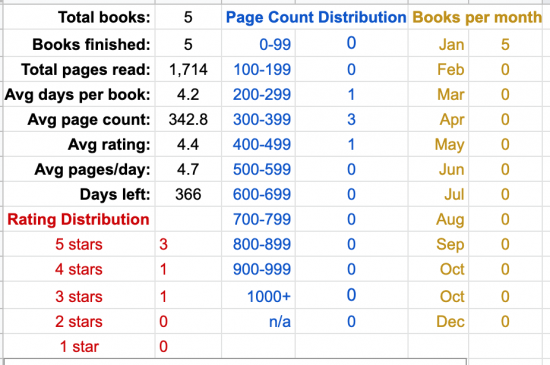
Books Per Month, Rating Distribution, and Page Count are also displayed in graph form below those tables.
Then we get to Categories and this is the part that Estelle and Max improved so brilliantly.
Here’s the current list of Categories:
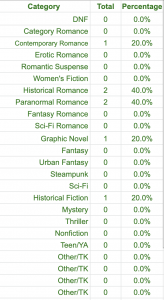
Thanks to the magic of Estelle and Max’s edits, all you need to do is change the label of the category in Column G.
Change the name, and make sure you use that name in the same format on the Books Read 2023 tab.
The category statistics are compiled from the data entered in column K of the “Books” tab. So if you added “Historical Fiction, DNF” as the genre/category for Pride and Prejudice, your statistics would include 1 Historical Fiction and 1 DNF. As Andrea noted in her original construction, totals may be higher than total number of books because categories may overlap.
You’ll notice that several of the categories read “Other/TK.” It’s easy to make changes now: type in the genre or category you want to add, or change one of the existing labels to fit your tastes.
Again: the words you use have to be consistent, and that includes capital letters. “Western” and “western” are not interchangeable.
Additional Graphs – Make Your Own, Customize, Have Fun!
Then there are the graphs at the bottom: Diverse Characters and Marginalized Writers. You can adjust the titles and the data to fit your own needs or goals, of course.
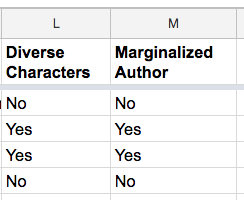
The data you enter into columns L and M on the “Books” tab create the pie charts on the “Statistics” page:
So:
Becomes:

These charts are based on the sample data I entered, and I kept the fields as “Yes/No” for ease of demonstration.
You can customize these columns and charts to fit your own reading goals, interests, and habits.
For example, if you read mostly queer romance and want to focus on detailed representation of sexuality, instead of Column L reading “Diverse Characters,” you can change it to “LGBTQIA+?” and track more specific options, such as characters who identify as Gay, Lesbian, Transgender, Aro, Ace, etc.
So with this data:

The pie chart would look like this:

As long as you are consistent with the terminology, your chart should accommodate the data.
Make it your own to help you!
Again, the data shown here is all based on the sample books I entered. Once you delete the sample data and begin entering your own, you’ll see your own reading history. I have found using this spreadsheet to be very inspiring: I want to keep reading and keep adding to my totals, and I already read quite a lot.
Again, you can grab your own copy of the 2024 Reading and Books Data Spreadsheet by clicking this link, and, inside the Google Sheets menu, clicking “File — Make A Copy” to create your own spreadsheet inside your Google Drive.
The Super-Powered Version!
Elizabeth shared their version with me, and you can File — Make a Copy of the Super-Powered version right here.
Elizabeth explained the alterations in a very neat five-point list:
- Added a tab “Lists”, that I use to fill the drop-down list feature that I enabled. If I add the Genre “Graphic Art” to the bottom of that list on the tab, then “Graphic Art” will be added to the interface.
- Changed the order of the columns in the “To Be Read” tab, so that I could copy and paste them to my current reading list.
- Added a tab “Author Book List”, to hold data I pulled out of various Google searches, to list all the books in an Author’s series, in case I want to read them in order, or read them all. The columns again are in the same order as my current reading list, so I can copy and paste.
- For audiobooks, I added a tab named “timespan” to calculate the percentage done by comparing the hours/minutes/seconds listened to the total hours/minutes/seconds. I show that result in my current reading list.
- In the main tab “Books Read Current”, I added some more columns to the right for checking data quality, and others to allow me to deal with omnibus books — for example, when Nora Roberts packages all three Key books in one ebook, and I want to track each of the three books individually.
I use orange color coding for the Omnibus calculations — you select “Yes” in the “Multi Book Flag”, and then enter data in the dark orange fields, and look at the calculations in the light orange fields.
I have played around with the Super Powered Version a little and my GOSH it is robust!! I hadn’t been bothered by the page count vs. time listened element even though I consume a lot of audiobooks, but tracking time listened makes a LOT of sense. Thank you Elizabeth!
I hope the spreadsheet options are helpful.
Again, massive thanks to Andrea for sharing the original version, and to Estelle and Max for the category upgrade, to Elizabeth for the super-powered version, and to everyone who has made suggestions for refining and customizing each version.
What do you want to track? Do you think this will be useful for your own reading habits? And did you track last year? What did you think?
Happy New Year of Reading!

Thanks for this! I’ve been discussing with friends that I haven’t been tracking my reading outside my e-reader. I don’t know that I’ll keep it up all year, but it’s got to be better than what I’m using now (nothing).
Also, thanks for the suggestion to set a weekly to-do to update the spreadsheet. That might help me keep up with it. I was redoing those lists for the new year anyway.
I do a version of this spreadsheet, but I also included a section/tab for setting location as Google Sheets will let you do a map chart – so now I can see where in the world/US states I have traveled by book. True, this is mostly US and UK, but I love to see where else my reading takes me.
Thank you all! I love the spreadsheet and the data it collects, and am so glad that Andrea, Estelle, Max and Elizabeth did all the hard work to make it so usable and fun (data IS fun!).
Just one correction: On the Statistics tab, cell B8, need to change the year to 2024 for it to count the days remaining properly.
I even have my first book to add to it. DIAMOND EYE by Kate Quinn. Highly recommend.
Although I would like to keep better track of my series reading, I am no fan of spreadsheets, perhaps because I am not adept at their use. With the idea from Track Your Reading last year, I hired a programmer through Upwork to create a database for me. I haven’t finished setting it up, but wanted to include this idea. It was very easy to work with the programmer.
Thank you, Sarah; and thank you to everyone who provided the info and updates for the spreadsheet! Last year, I stopped tracking in February, and hope following Sarah’s suggestion of updating once a week will enable more success this year.
Thank you! I started to write a comment yesterday asking about this, but I thought I would wait a bit because you never let me down. Thank you Andrea, Estelle, Max and SB Sarah!
Thanks again for this! I’m not really a spreadsheet person but keeping track of my reading has been insightful and made me a more thoughtful reader. The last 2 years I have added a “trope” column to keep track of which of those I was reading most often in romance. It did not line up with what my expectations the first year. (I would not have said I particularly enjoyed “second chance” let alone that I read so many!) I was closer this time.
I don’t track my reading, but that’s making book discussions here and on ONTD (lol) difficult, so I’m making a change this year. I also want to record how I found out about a book (usually here) because that’s almost impossible to recall. Thanks!
Thank you, Andrea, Estelle, Max, and SB Sarah! WOW on the work behind this–this definitely makes me want to learn more aout pivot tables, LOL!
I adapted a table I picked up somewhere years ago, which has a lot of similar elements, including a few I stole from y’all and added. A few I didn’t notice which I enjoy:
I track the first letters of the title and author and build a summary table – that’s fun to watch fill in, as some letters are common starting names but not other words or vice versa. Plus the “will X show up if I don’t hunt it down” question.
I also track re-reads, new-to-me authors, and works in translation.
With the publication date information you could build another summary table or chart – mine has 2024/23/20s, then runs back a few decades, then centuries, and everything before 1800 is Real Old Books. It’s very satisfying to add one of those.
I may be in the minority, but I’ve never been enthused about this form of reading tracking. It kind of takes the fun out of reading, at least for me. I use spreadsheets at work, and this just feels like more work. I use Goodreads to record the books I’ve read and that’s about as much effort as I want to put into it. I don’t particularly care about the data inherent in my reading habits. Is there anyone who uses this practice and found that it appreciably improved their overall reading experience, and if so, how?
@Lauren, for me, it’s really helpful to realize when I’m falling into a reading slump. One of the columns that I add to the tracker each year is “New/re-read”, so when I see that for 5-10 books straight I’m re-reading books, that tells me I need to really think about what might spark my interest right now. What am I not getting from my TBR – is it anxiety, so I need a comfort read? Is it lack of enthusiasm for new releases? It really helps me work out how to find the joy in reading again.
I also struggle with the Read Harder type challenges, but do want to be more mindful about what I read, supporting less popular authors where I can. This type of tracking is a gentler way for me to poke at myself that maybe I can read something that’s a bit less heteronormative, American big city based.
These two things make it less of a chore (which I totally understand if you’re always in a spreadsheet!), and more of a prompt to help me understand how I’m stuck in a genre box and can’t get out. As always, YMMV.
@Lauren, I use my spreadsheet to keep track of titles I have already bought so I don’t buy duplicates. I have columns for Collection, Author, and Title. The collection may be a box set or an anthology, and listing each book or story title in a separate entry tells me if I already have that particular title so I don’t buy it again.
I also have a column called Read Again? where I fill in Yes/No/Maybe (or TBD if I haven’t read it yet). Then when I sort by author I can see if I liked any/some/most/all of their work. That helps me decide if I want to buy other books by the same author.
I don’t have any reading goals except to read what I like, when I like, and don’t spend money if I don’t have to!
Hello! Did I miss a step where I can combine my old spreadsheets with the new one? I want a place where I can see all of my reads, in one place.
Thanks so much – I love these tools!
I started “using” the spreadsheet in 2022. I say “using” because I only made it halfway through the year with the inputting. BUT, I started keeping rough notes in Notes to facilitate spreadsheet entry and have kept that part up to this day so I still credit the spreadsheet for helping me keep track of my reading.
I used a simplified version of the spreadsheet because I’m mostly interested in how many books I read, what genres they are, and how much and what I’m rereading. I liked watching the graphs move. I just got lazy about entering data (I hardly ever use my laptop anymore but my phone is always right there and I can’t do spreadsheets on a small phone screen.). I’ve kept up my Notes lists, though, and they’ve been invaluable for looking back to see if I’ve read a particular book or author before and whether I liked it or figuring out where I left off in a series, especially if I’m rereading. They also make it possible for me to participate in end of the year posts like the recent “Our Favorite Reads of 2023” since my memory for authors and titles has turned to crap.
Hello, thank you so much for sharing the chart! I’m not sure if the “book finished” data is correct though, because the number is the same as “total books” no matter what I log.. Can you advise what the formula is supposed to be doing?
=COUNTIFS(‘Books Read’!A2:A,”*”,’Books Read’!K2:K,”*DNF*”)
Thank you!
This year is a leap year, so the formula for counting how many books read in Feb needs to be adjusted to 2/29/2024
@Lauren – I get a little bit of dopamine when I finish a book and add it to my list. I’ve been keeping a list for about 15 years now, and starting using this spreadsheet (way more useful than how I was doing it previously) in 2021. I also like stats and graphs, so its fun to make them out of my own data.
It’s also useful when people ask for recommendations or I’m trying to remember something about a book.